> ## Documentation Index
> Fetch the complete documentation index at: https://docs.safidata.com/llms.txt
> Use this file to discover all available pages before exploring further.
# Persona Generator
> Automatically generate audience personas from your survey responses.
 ## Overview
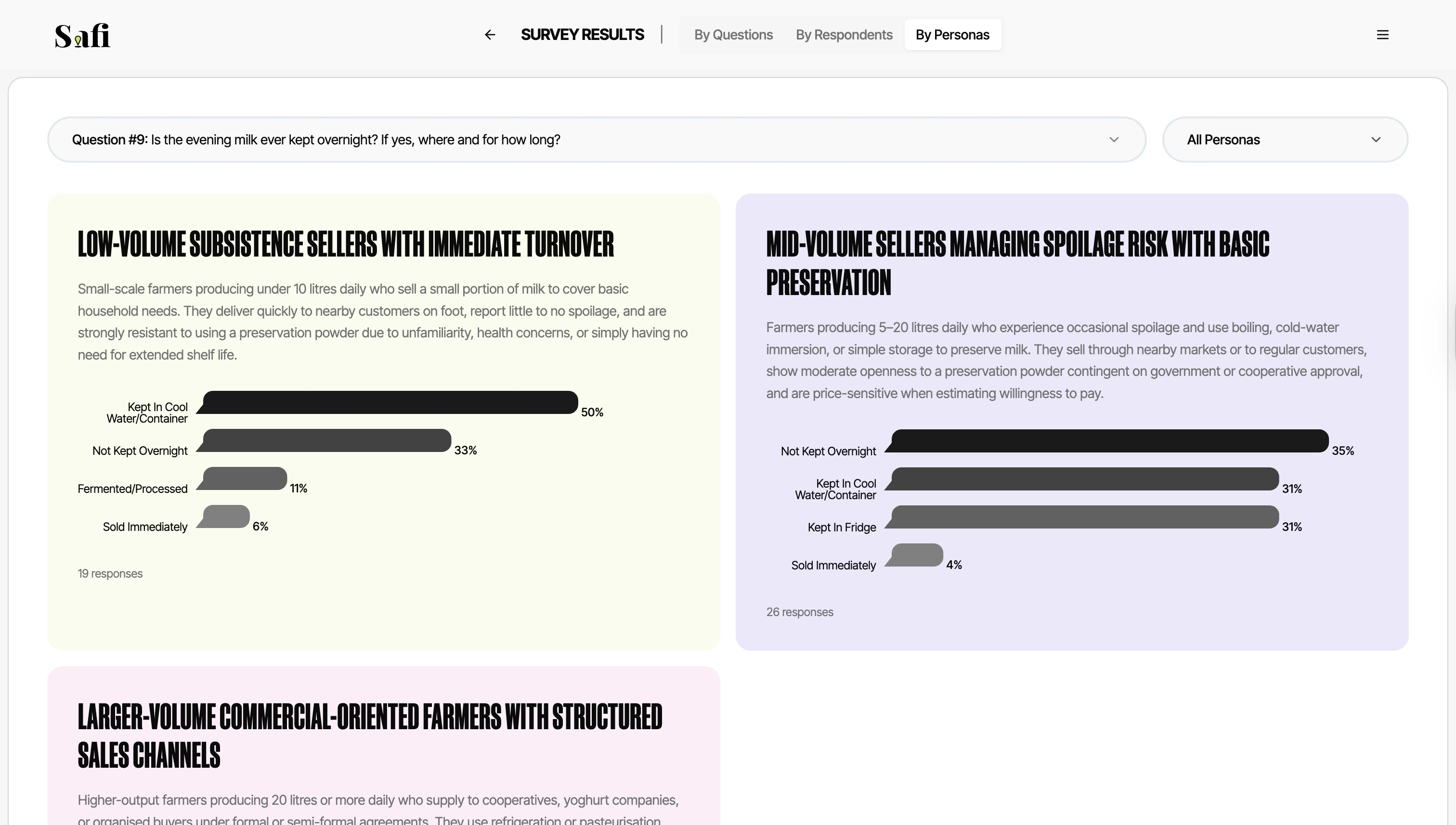
The Persona Generator analyses all of your survey responses and automatically creates a set of distinct audience personas - archetypal profiles that represent the different types of people in your dataset.
This is particularly useful for product teams, marketers, and researchers who want to communicate findings to stakeholders in a concrete, human way.
***
## How It Works
When you click **Generate Personas**, Safi Data's AI reads all transcripts and clusters respondents into groups based on shared attitudes, behaviours, and characteristics. Each group is turned into a persona with:
* **A name and archetype** — e.g. *"The Cautious Saver"* or *"The Aspirational Urban Professional"*
* **A short bio** — a paragraph describing who this person is, what they value, and how they behave
* **Answers summarized** — a bar graph summarizing their responses per question
***
## Generating Personas
1. Open a completed or live survey
2. Click the **Persona Generator** tab
3. Click **Generate Personas**
4. Wait 30–60 seconds while the AI processes your transcripts
5. Review the generated personas
You can regenerate personas at any time — for example, after more responses have come in, or if you want to explore a different clustering of your data.
Persona generation requires at least 10 completed responses to produce meaningful clusters. For richer, more differentiated personas, we recommend 30+ responses.
***
## Editing Personas
AI-generated personas are a starting point. You can edit any persona directly:
1. Click the **Edit** icon on a persona card
2. Update the name, bio, characteristics, or quotes
3. Click **Save**
Edited personas are saved to your survey and will not be overwritten when you regenerate.
***
## Overview
The Persona Generator analyses all of your survey responses and automatically creates a set of distinct audience personas - archetypal profiles that represent the different types of people in your dataset.
This is particularly useful for product teams, marketers, and researchers who want to communicate findings to stakeholders in a concrete, human way.
***
## How It Works
When you click **Generate Personas**, Safi Data's AI reads all transcripts and clusters respondents into groups based on shared attitudes, behaviours, and characteristics. Each group is turned into a persona with:
* **A name and archetype** — e.g. *"The Cautious Saver"* or *"The Aspirational Urban Professional"*
* **A short bio** — a paragraph describing who this person is, what they value, and how they behave
* **Answers summarized** — a bar graph summarizing their responses per question
***
## Generating Personas
1. Open a completed or live survey
2. Click the **Persona Generator** tab
3. Click **Generate Personas**
4. Wait 30–60 seconds while the AI processes your transcripts
5. Review the generated personas
You can regenerate personas at any time — for example, after more responses have come in, or if you want to explore a different clustering of your data.
Persona generation requires at least 10 completed responses to produce meaningful clusters. For richer, more differentiated personas, we recommend 30+ responses.
***
## Editing Personas
AI-generated personas are a starting point. You can edit any persona directly:
1. Click the **Edit** icon on a persona card
2. Update the name, bio, characteristics, or quotes
3. Click **Save**
Edited personas are saved to your survey and will not be overwritten when you regenerate.
***